VIRAL AI MUSIC VIDEO STUDIO

Make an I Wanna Love You AI Video from One Photo

Upload one clear photo of a person or a pet to create a short AI video inspired by the viral pink-suit, night-tennis-court performance. The template supplies the scene and movement, so you do not need to write a prompt or edit clips by hand.

Create your video

STUDIO READY

Upload one photo and turn it into a short video.

By uploading, you confirm you're 18+, have permission to use this photo (no celebrities), and agree to our Terms of Service and Privacy Policy.

Video Quality480P
45 credits · 480P · Need more credits? See pricing

What Is the I Wanna Love You AI Video Trend?

TACTICAL INSIGHT // 01

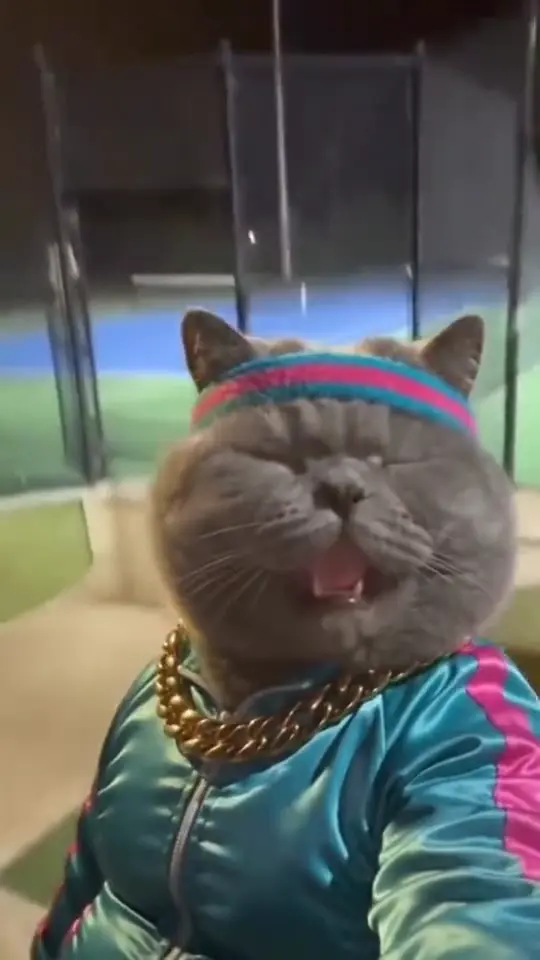
The I Wanna Love You AI trend is a photo-to-video effect based on a viral night-time selfie performance beside tennis courts, set to “I Wanna Love You” by Akon and Snoop Dogg. The recognizable version features a pink patterned suit, singing toward a front-facing camera, an exaggerated backward lean, and a final head movement or wave.

TACTICAL INSIGHT // 02

With I Wanna Love You AI, you upload one photo and generate a short video inspired by that performance. The preset provides the scene and movement, so you do not need to find a reference clip, write a text prompt, or assemble the footage in a video editor.

TACTICAL INSIGHT // 03

This generator currently creates a 14-second video. The result is an AI-generated version of the trend, not the original social-media upload, and details may vary from one generation to another.

What Does the I Wanna Love You AI Video Look Like?

The trend is known for its nighttime tennis-court setting, close-up selfie framing, pink-suit look, and dramatic movement as the performer sings along to “I Wanna Love You.” It became associated with AI character-remix videos, including pink-suit versions inspired by the Jean Phil meme.

People use the format to put themselves, a friend who has given permission, or a pet into a familiar performance. The appeal is the contrast between an ordinary photo and an over-the-top music-video scene. Pet versions use the same idea, although an animal’s face and body may animate differently from a human subject.

I Wanna Love You AI is an independent video-generation tool. It is not an official product from the song artists, TikTok, or the creator of the referenced viral character. The song and other third-party material remain subject to their owners’ rights.

How to Make an I Wanna Love You AI Video in 3 Steps

  1. 01PHASE 01

    1. Upload One Clear Photo

    Choose one photo of a person or one pet. JPEG, PNG, and WebP images up to 10 MB are supported. A front-facing, well-lit image with the face clearly visible gives the generator a useful reference. Do not upload a celebrity photo or an image you do not have permission to use.

  2. 02PHASE 02

    2. Choose the Video Quality

    Select 480p, 720p, or 1080p before generating. The credit cost is 45 credits for 480p, 90 credits for 720p, and 180 credits for 1080p. Higher resolution uses more credits.

  3. 03PHASE 03

    3. Generate and Download Your Video

    Press Create video and wait for processing to finish. Generation usually takes about 2–4 minutes, depending on queue demand. The current output is a 14-second AI video. When it is ready, open it from the results area or My videos and download it to share.

Best Photo Tips for an I Wanna Love You AI Video

Start with a clear reference photo to help the subject remain recognizable throughout the movement.

  • ✓Upload one person or one pet per image. The current upload flow says celebrity photos are not allowed.
  • ✓Choose a front-facing, well-lit photo with the face clearly visible.
  • ✓Avoid sunglasses, masks, heavy filters, motion blur, and extreme camera angles that hide important facial details.
  • ✓Use an image where the subject is centered and not cropped too tightly around the face.
  • ✓For pet videos, choose a photo where the eyes, muzzle, and distinctive markings are easy to see.
  • ✓Use only photos you own or have permission to use, and get consent from any adult shown in someone else’s photo.
  • ✓Expect some variation in facial details and movement: AI video may contain artifacts, especially during large head turns or backward-leaning poses.

I Wanna Love You AI Video Generator FAQ

What is I Wanna Love You AI?

I Wanna Love You AI is a photo-to-video generator for making a short AI performance inspired by the viral “I Wanna Love You” pink-suit selfie trend. Upload one photo of an adult or a pet to place the subject into the preset performance.

How do I make an I Wanna Love You AI video?

Upload one JPEG, PNG, or WebP photo up to 10 MB, choose 480p, 720p, or 1080p, and click Create video. You do not need to upload a dance reference or write a prompt. Once processing finishes, download the generated clip from your results or My videos.

Does the video use the pink-suit, night-tennis-court trend?

Yes. The generator is designed around the recognizable I Wanna Love You selfie performance associated with the pink-suit, night-tennis-court clip. The output is an AI-generated 14-second version, so it may not reproduce every frame of the longer viral source clip exactly.

Can I make an I Wanna Love You AI video with a cat or dog?

Yes. You can upload one clear photo of a cat or dog. Pet results may look different from human results because animal faces and bodies move differently, and AI-generated motion can contain visual artifacts.

Do I need a prompt, a reference video, or editing skills?

No. The template is preset. Upload one eligible photo, select the output resolution, and start generation. You do not need to supply your own dance footage or edit the result manually.

How long is the generated video?

Each generated video is 14 seconds long. This is the duration of this generator’s output; the original viral pink-suit clip may be longer.

How long does video generation take?

Generation usually takes about 2–4 minutes. Processing time can vary with queue demand, so a result may take longer during busy periods.

What resolutions are available, and how many credits does each cost?

480p costs 45 credits, 720p costs 90 credits, and 1080p costs 180 credits per video. Select the resolution in the creation interface before you generate.

How do credit packs work? Is there a subscription?

I Wanna Love You AI uses one-time credit packs rather than a recurring monthly subscription. The available packs contain 160, 360, or 560 credits. Each generated video deducts credits based on the resolution you select: 45 for 480p, 90 for 720p, or 180 for 1080p.

Will the generated video look exactly like my photo?

Your uploaded photo guides the subject in the generated video, but exact results are not guaranteed. Large head or body movements may change facial details, clothing, or proportions between frames. For a better starting point, use one well-lit photo with the face clearly visible and unobstructed.

Are my uploaded photos private? Are they used to train AI models?

The site states that uploaded images are processed to generate the requested video, are not shared publicly, and are not used to train third-party models. Do not upload sensitive images or photos you do not have permission to use.

Can I use my generated video commercially?

The site advertises commercial-use rights for generated output. Those rights do not automatically include permission to use the underlying song, trademarks, or other third-party material. If you publish or monetize a video containing copyrighted music, you are responsible for following the relevant rights holders’ terms and the rules of the platform where you post it.

Is I Wanna Love You AI an official tool from the song artists or TikTok?

No. I Wanna Love You AI is an independent AI video-generation tool. It is not presented as an official product from Akon, Snoop Dogg, TikTok, or the creator of the referenced viral character.
Credits

One balance for everything. Each video costs credits depending on resolution; top up anytime.

Starter

$4.99/ one-time pack

50 credits

  • Standard queue processing
  • Fixed 480P standard export
  • 14-second beat-locked motion sync
  • Full commercial usage rights

Google sign-in required at checkout

Creator

MOST POPULAR
$12.90/ one-time pack

140 credits

  • Priority generation queue
  • 720P / 1080P high-definition export
  • 14-second beat-locked motion sync
  • Full commercial usage rights

Google sign-in required at checkout

Studio

$24.90/ one-time pack

280 credits

  • Fastest priority processing
  • Full resolution unlocks up to 1080P
  • 14-second beat-locked motion sync
  • Full commercial usage rights

Google sign-in required at checkout

Ready to see your photos in motion?

It takes less than a minute — upload a photo and press Create.

Start creating